Security and Access
Access to the analyzer's configuration functions is protected at two levels: a PIN for the on-screen menu and a password for the Web Admin interface.
Display PIN
The configuration menu (Settings) is protected by a 4-digit PIN.
- First access: the first time you enter the menu you are asked to set a new PIN, entered twice for confirmation.
- Subsequent access: the PIN is requested every time you enter the menu. The session stays valid as long as you remain in the menu and ends when you exit to the measurement pages.
- Change PIN: from Settings → Security → Change PIN (requires the current PIN).
The UP/DOWN buttons change the selected digit, CONFIRM (OK) moves to the next digit.
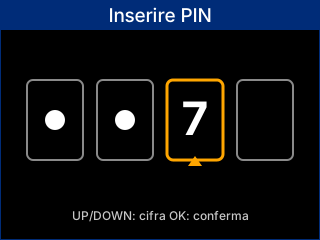
PIN entry screen
Resetting a forgotten PIN
If the PIN is forgotten, it can be cleared with a hardware combination at startup:
- Power the device off and on again.
- During the startup screen, simultaneously press and hold UP and DOWN for about 5 seconds.
- When the countdown ends, the reset confirmation appears.
At the next menu access you will be asked to set a new PIN.
Web Admin (local web interface)
The Web Admin interface allows you to configure and monitor the device from a browser, by connecting to its IP address. For security reasons it is disabled by default and must be enabled on demand:
Settings → Communication → Web Admin → Enable
Once enabled:
- Access requires authentication (default user admin, configurable password).
- The service turns off automatically after 10 minutes of activity; the menu shows the remaining time and the IP address to connect to.
Resetting the Web password
The Web Admin interface password can be restored to its default value (admin) from:
Settings → Security → Reset Web Password
It is recommended to set a new password immediately after the reset.
Resetting the network configuration
The Wi-Fi configuration can be restored to the "not configured" state from:
Settings → Communication → Network → Wi-Fi → Reset Wi-Fi
After the reset you will need to run the Wi-Fi Setup procedure again.
Resetting the energy counters
The energy counters (total and per phase, imported and exported) can be reset from:
Settings → Measurement → Reset energy counters
Resetting the energy counters is irreversible: all totals and per-phase values are permanently deleted.
Firmware updates (OTA)
The analyzer supports over-the-air (OTA) firmware updates:
- Automatic: when connected to the Internet, the device can automatically check for and install available updates.
- Manual: through the Web Admin interface, by uploading the provided update file.
During the update the display shows the progress; when finished the device restarts automatically. Do not remove power during the operation.
Cybersecurity features
The analyzer integrates several security measures:
- Cloud data transfer encrypted via MQTT over TLS
- Flash memory encryption and Secure Boot
- Secure authentication of cloud services through a temporary TOTP code
- Ability to disable unused services and ports
For details on the cybersecurity features, see the Specifications page.